Drop a link.Keep the clip.লিংক দাও।ক্লিপ নাও।

ভিডিও, রিল, প্লেলিস্ট আর পুরো কোর্স।Videos, reels, playlists and whole courses.

GrabClip is a free Windows app that saves videos, reels and course lessons you have the right to access. Paste a link, pick a quality, press Download. No terminal, no Python, no setup.GrabClip একটা ফ্রি Windows অ্যাপ। যে ভিডিও, রিল বা কোর্সের লেসন দেখার অধিকার তোমার আছে, সেগুলো সেভ করতে লিংক পেস্ট করো, কোয়ালিটি বাছো, Download চাপো। টার্মিনাল, Python বা কোনো সেটআপ লাগে না।

Version 1.0.1 for Windows 10 and 11. Free for personal use. No admin password needed.Windows 10 ও 11-এর জন্য, ভার্সন 1.0.1। ব্যক্তিগত ব্যবহারে ফ্রি। অ্যাডমিন পাসওয়ার্ড লাগে না।

Up to 4K4K পর্যন্ত Whole coursesপুরো কোর্স Bangla subtitlesবাংলা সাবটাইটেল
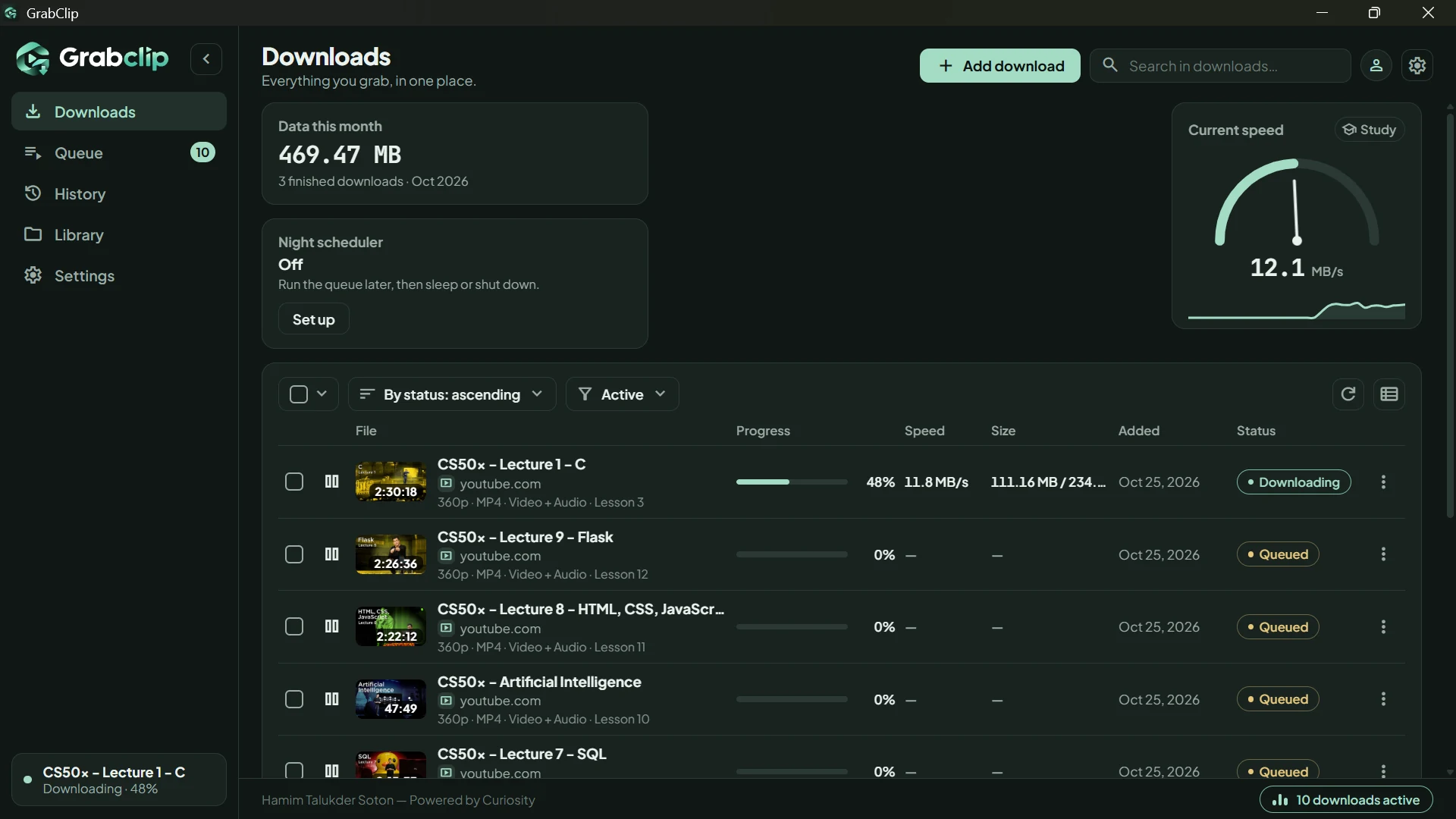
GrabClip Downloads page with live progress bars, a speed gauge and a night scheduler card
  • YouTube
  • Facebook
  • Instagram
  • TikTok
  • and moreআরও অনেক

Videos, reels, playlists and whole courses from these sites, and from many more.এই সাইটগুলো থেকে, আর আরও অনেক সাইট থেকে ভিডিও, রিল, প্লেলিস্ট আর পুরো কোর্স।

Everything you grab, in one place.যা কিছু নামাও, এক জায়গায়।

Whole courses, in orderপুরো কোর্স, সাজানো

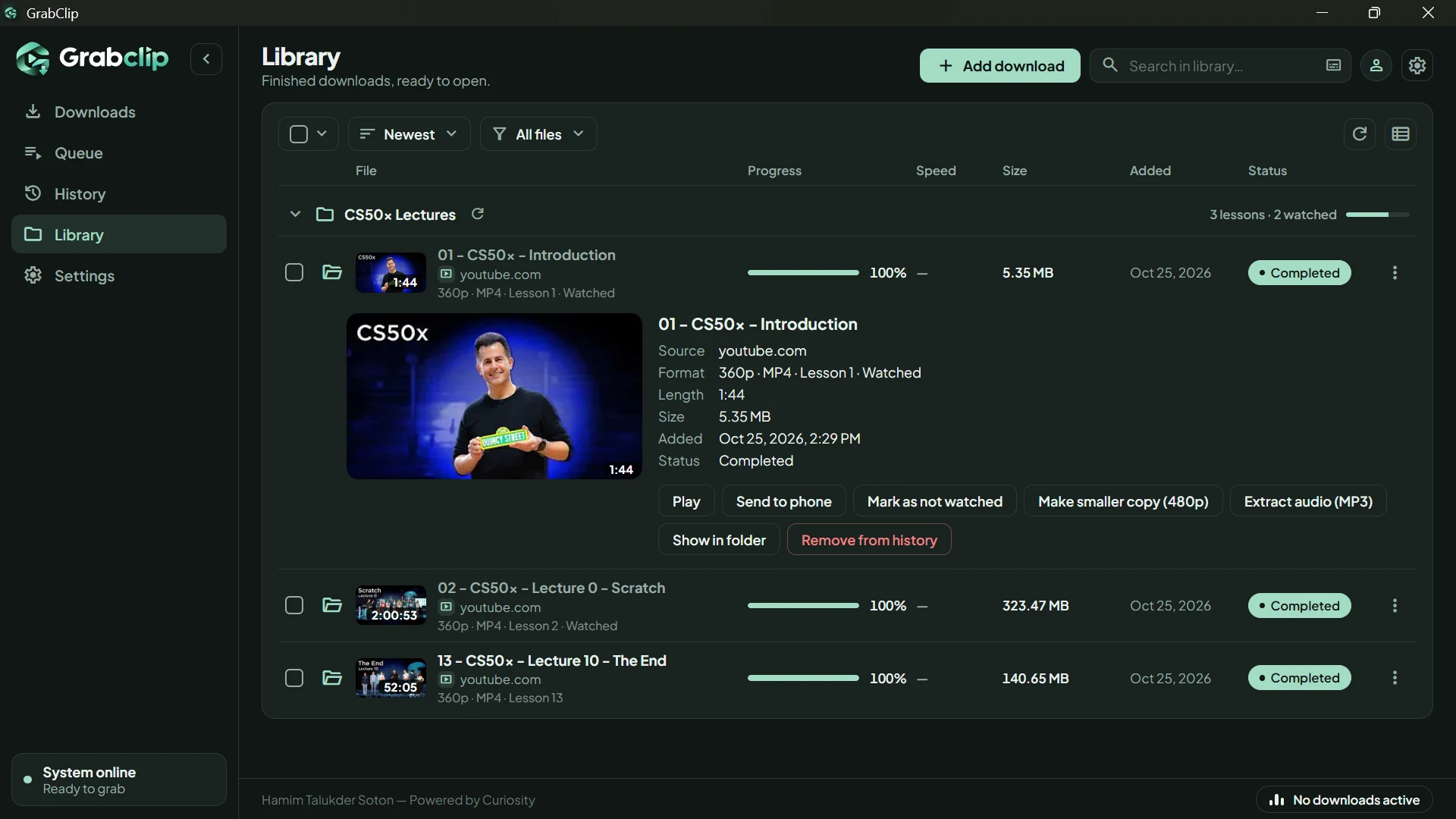
Paste a playlist link. Every lesson lands in one folder as 01, 02, 03, with a watched mark. Later, check for new lessons and get only what is new.প্লেলিস্টের লিংক দাও। প্রতিটি লেসন এক ফোল্ডারে 01, 02, 03 নম্বর দিয়ে সেভ হয়, সাথে দেখা-হয়েছে চিহ্ন। পরে নতুন লেসন চেক করলে শুধু নতুনগুলোই আসে।

GrabClip Library with a course folder, lessons and watched marks

Night schedulerনাইট শিডিউলার

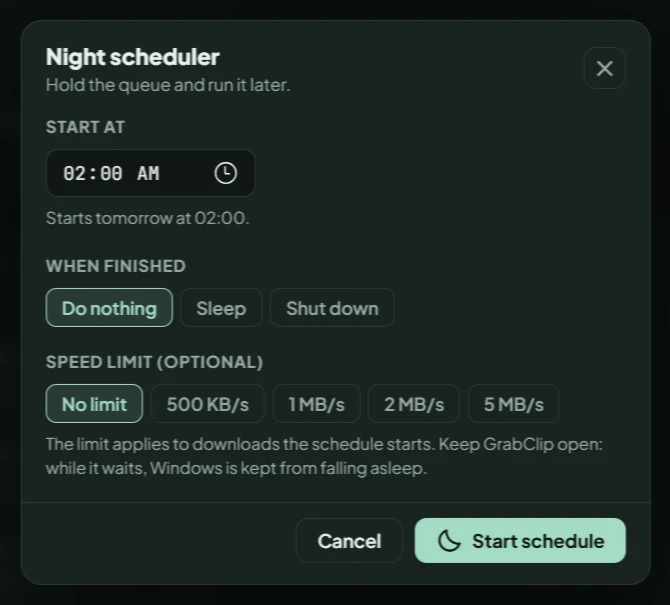
Hold the queue, start it at 02:00, cap the speed, then let the PC sleep or shut down.কিউ ধরে রাখো, 02:00-তে শুরু করাও, স্পিড লিমিট দাও, শেষ হলে পিসি স্লিপ বা শাটডাউন।

GrabClip night scheduler with start time, what happens when finished and speed limit

Built-in playerবিল্ট-ইন প্লেয়ার

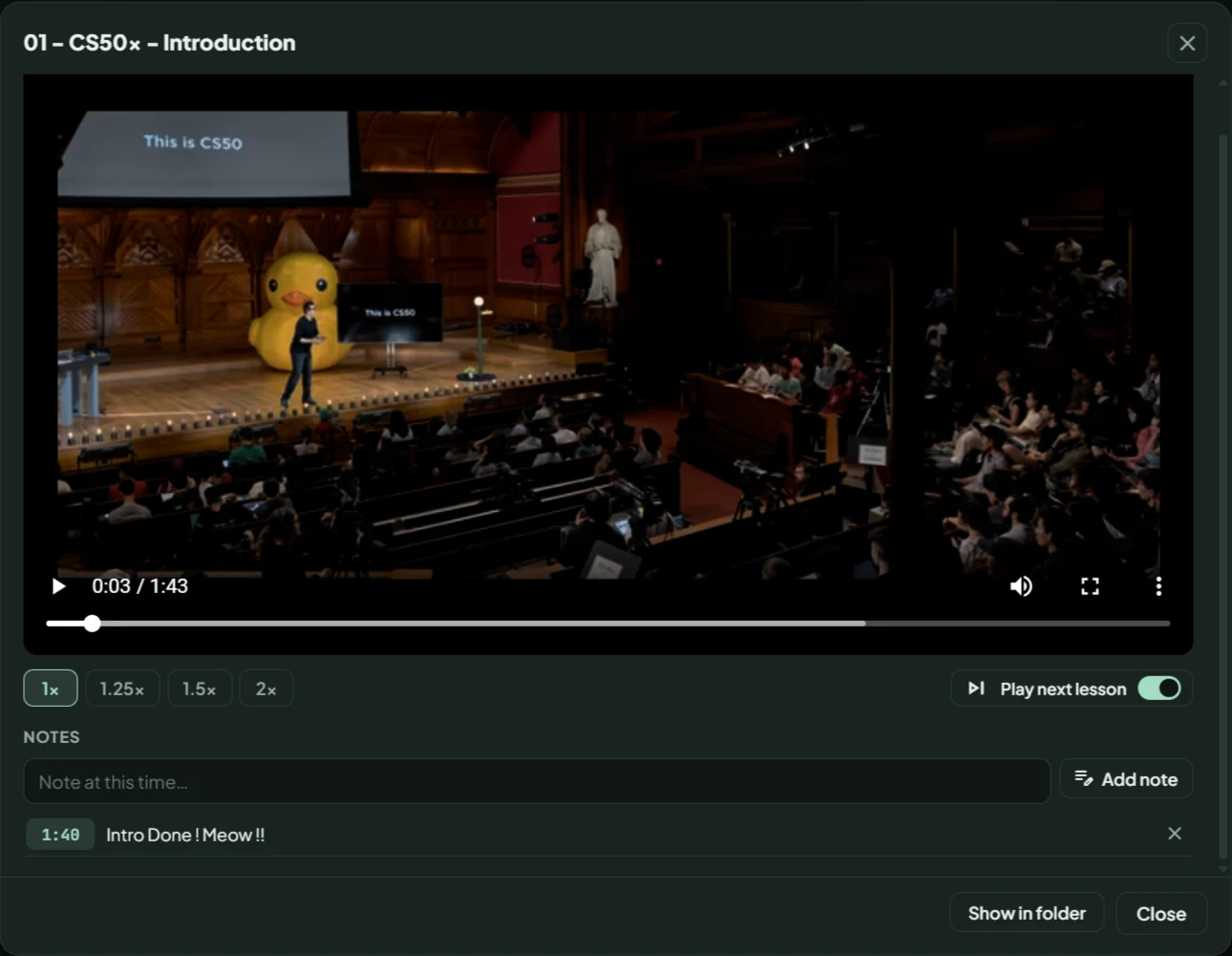
Picks up where you stopped. 1× to 2× speed, notes with time stamps, and the next lesson plays by itself.যেখানে থামিয়েছিলে সেখান থেকে চলে। 1× থেকে 2× স্পিড, সময়সহ নোট, আর পরের লেসন নিজে থেকেই চলে।

GrabClip built-in player with speed buttons, play next lesson and notes

Send to phoneফোনে পাঠাও

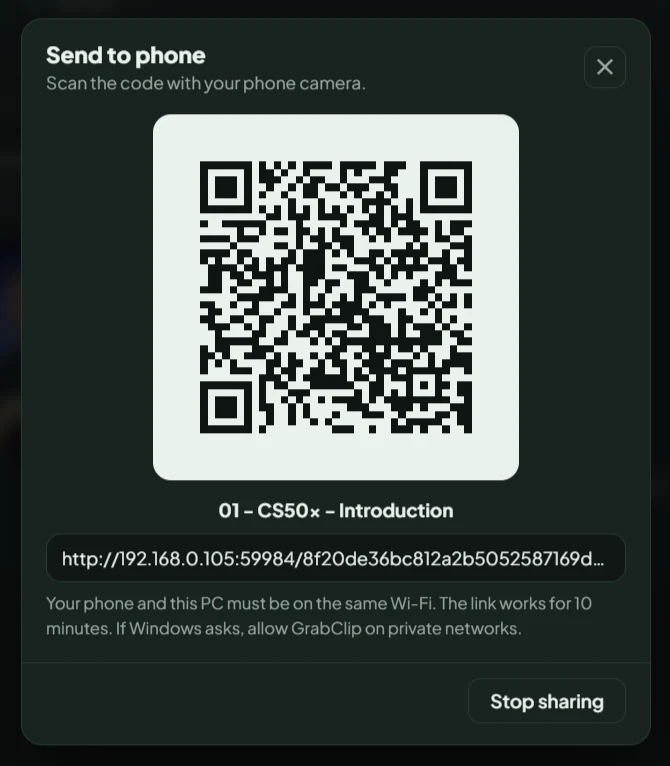
Scan a QR code and watch on your phone over the same Wi-Fi.QR কোড স্ক্যান করো, একই Wi-Fi-তে ফোনে দেখো।

GrabClip Send to phone dialog with a QR code

Grab a clipক্লিপ নাও

Only the part you need, not the whole video.পুরো ভিডিও না, শুধু যেটুকু দরকার।

Search inside videosভিডিওর ভেতরে খোঁজো

Type a word, jump to the second it was said. Works when the video has captions.একটা শব্দ লেখো, যে সেকেন্ডে বলা হয়েছে সেখানে চলে যাও। ক্যাপশন থাকলে কাজ করে।

Your quality, your formatতোমার কোয়ালিটি, তোমার ফরম্যাট

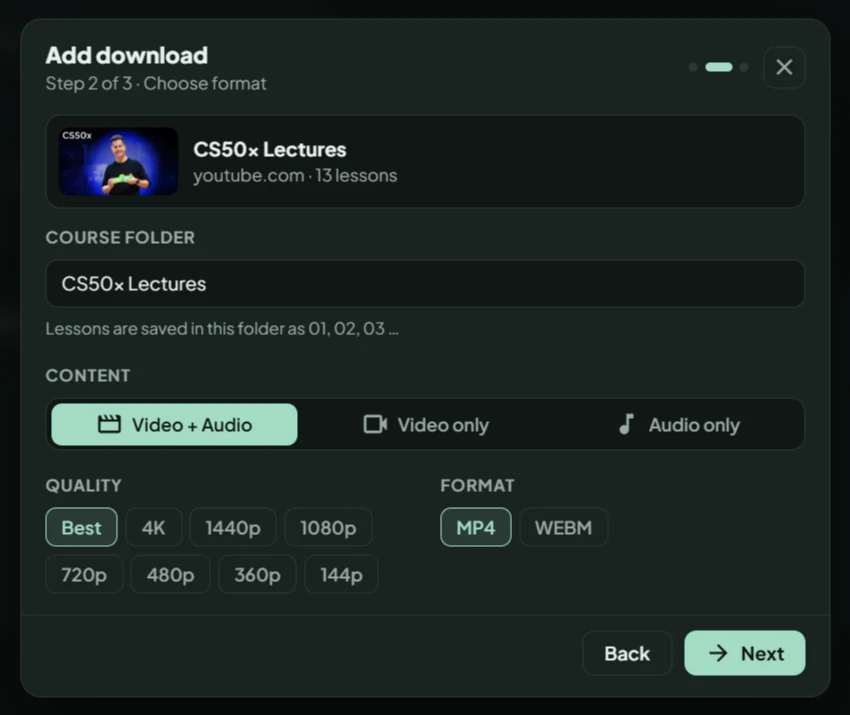
Pick Video + Audio, Video only or Audio only. Fast mode uses several connections at once for more speed.Video + Audio, Video only বা Audio only বাছো। Fast mode একসাথে কয়েকটা কানেকশনে বেশি স্পিড দেয়।

Qualityকোয়ালিটিBest4K1440p1080p720p480p360p144p
AudioঅডিওBestMP3AACOPUSFLAC
Video formatভিডিও ফরম্যাটMP4WEBM

Keeps goingথামে না

  • Internet drops? It retries by itself.ইন্টারনেট গেলে নিজে আবার চেষ্টা করে।
  • Disk almost full? It pauses before it fails.ডিস্কে জায়গা কম হলে ফেইল করার আগেই পজ করে।
  • Closed the window? It keeps running in the tray.উইন্ডো বন্ধ করলেও ট্রেতে চলতে থাকে।
  • Pause and resume any time. Half files are kept.যখন খুশি পজ আর রিজিউম। আধা-ডাউনলোড ফাইল থেকে যায়।
Up to 50 links at onceএকসাথে ৫০টি লিংক Smaller 480p copy480p ছোট কপি Extract MP3MP3 আলাদা করা Study mode speed capস্টাডি মোড স্পিড ক্যাপ Link suggestion from clipboardক্লিপবোর্ডের লিংক সাজেশন Duplicate warningডুপ্লিকেট সতর্কতা Monthly data counterমাসিক ডেটা কাউন্টার

Three steps. Really.তিন ধাপ, সত্যিই।

1

Paste the linkলিংক পেস্ট করো

Choose YouTube, Facebook, Instagram, TikTok or Other, paste the link and press Analyze link. You can paste many links at once.YouTube, Facebook, Instagram, TikTok বা Other বাছো, লিংক পেস্ট করে Analyze link চাপো। একসাথে অনেক লিংকও দিতে পারো।

2

Pick quality and formatকোয়ালিটি আর ফরম্যাট বাছো

See the thumbnail, title and size first. Then choose content, quality and format, and press Next.আগে থাম্বনেইল, টাইটেল আর সাইজ দেখে নাও। তারপর কনটেন্ট, কোয়ালিটি আর ফরম্যাট বেছে Next চাপো।

3

Press DownloadDownload চাপো

Add subtitles, thumbnail or Fast download if you want. Watch the progress. Finished files wait in your Library.চাইলে সাবটাইটেল, থাম্বনেইল বা Fast download অন করো। প্রোগ্রেস দেখো। শেষ হলে ফাইল Library-তে।

GrabClip Add download window, step 2: course folder, content, quality and format

Every setting, in plain words.প্রতিটি সেটিং, সহজ ভাষায়।

Five tabs in Settings. Nothing is hidden.সেটিংসে পাঁচটা ট্যাব। কিছুই লুকানো নেই।

Choose where files are saved (avoid OneDrive folders), turn the finish notification on or off, keep GrabClip running in the tray, and switch link suggestions on or off.ফাইল কোথায় সেভ হবে ঠিক করো (OneDrive ফোল্ডার এড়িয়ে চলো), শেষ হলে নোটিফিকেশন অন-অফ করো, GrabClip ট্রেতে চালু রাখো, আর লিংক সাজেশন অন-অফ করো।

GrabClip Settings, General tab

Your links, files and logins stay on your PC.তোমার লিংক, ফাইল আর লগইন তোমার পিসিতেই থাকে।

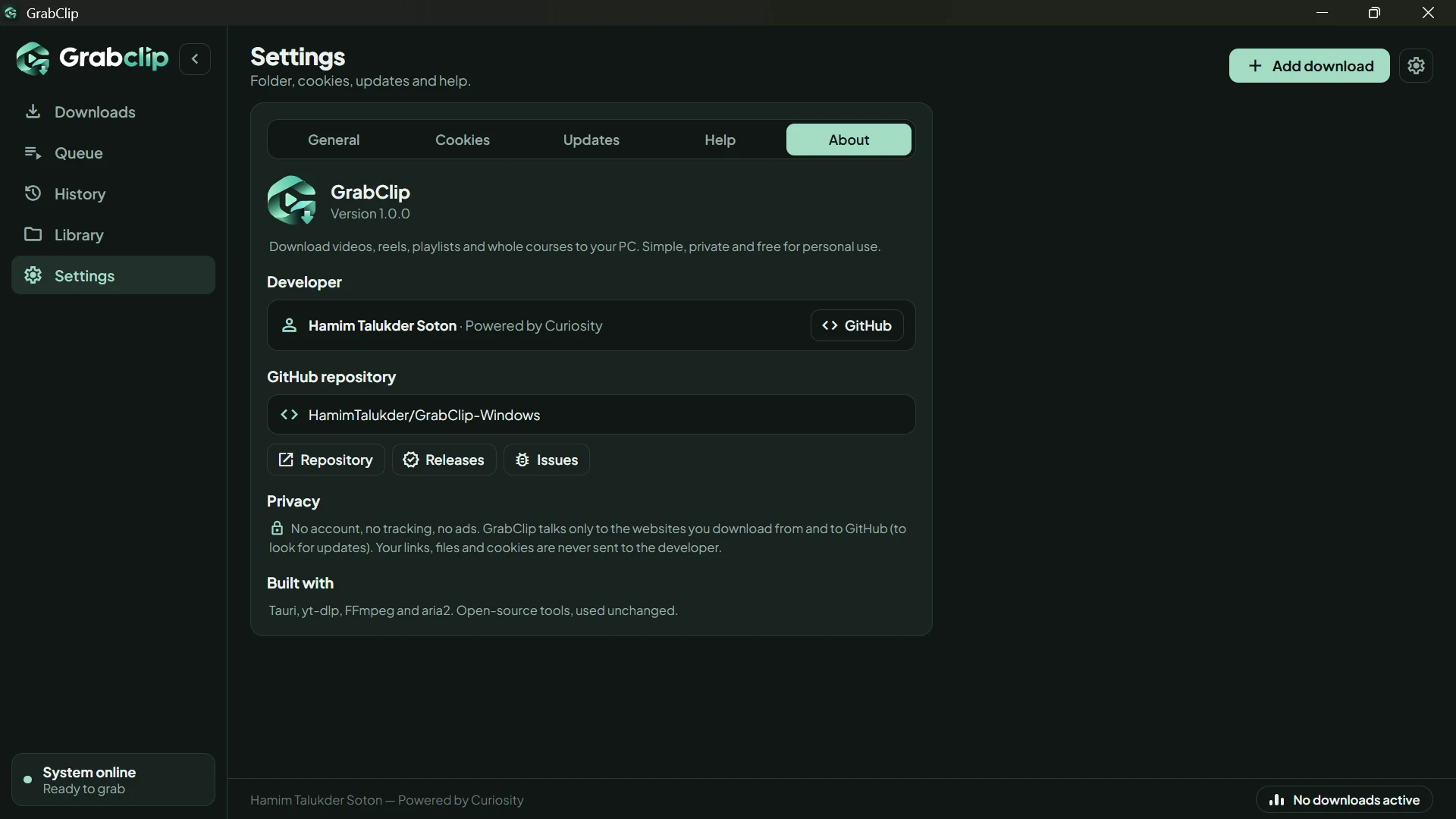
GrabClip only talks to the sites you download from, and to GitHub when it looks for an update. It never sends your links, files or cookies to the developer.GrabClip শুধু সেই সাইটগুলোর সাথে কথা বলে যেখান থেকে তুমি নামাচ্ছ, আর আপডেট খোঁজার সময় GitHub-এর সাথে। তোমার লিংক, ফাইল বা কুকিজ ডেভেলপারের কাছে কখনো যায় না।

  • No account.অ্যাকাউন্ট নেই।
  • No tracking.ট্র্যাকিং নেই।
  • No ads.বিজ্ঞাপন নেই।

Install in a minute.এক মিনিটে ইনস্টল।

1

Downloadডাউনলোড করো

Press Download for Windows. You get one .exe file.Download for Windows চাপো। একটা .exe ফাইল পাবে।

2

Run itচালাও

Double-click it. It installs for your user only, so no admin permission is needed.ডাবল ক্লিক করো। শুধু তোমার ইউজারে ইনস্টল হয়, তাই অ্যাডমিন পারমিশন লাগে না।

3

Blue screen?নীল স্ক্রিন এলে?

If Windows says “Windows protected your PC”, click More info, then Run anyway.Windows “Windows protected your PC” দেখালে More info চাপো, তারপর Run anyway।

4

Open GrabClipGrabClip খোলো

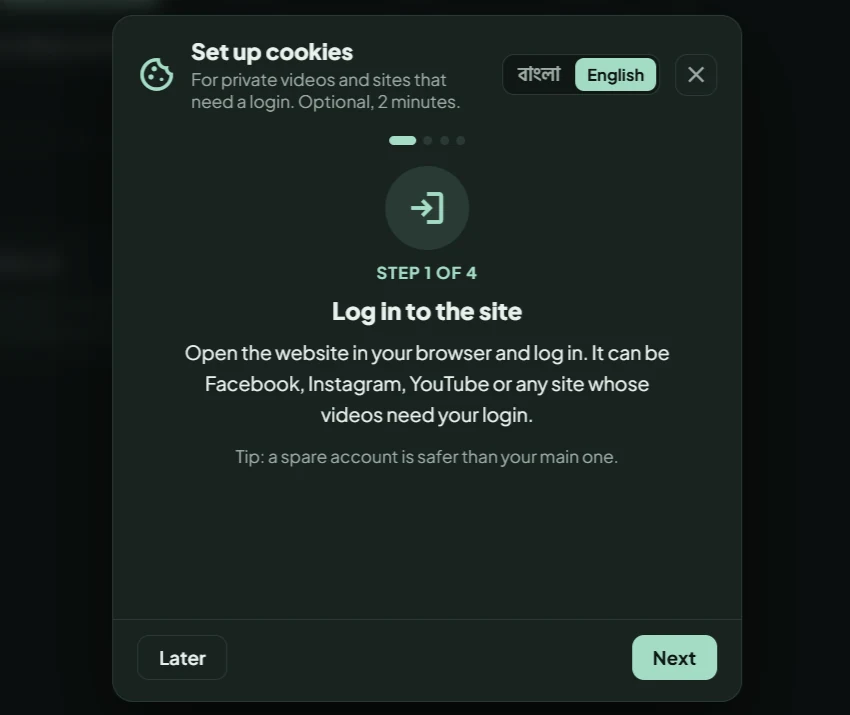
Find it in the Start menu. The first time, a short guide helps you set up cookies.Start menu থেকে খোলো। প্রথমবার কুকিজ সেট করার একটা ছোট গাইড দেখাবে।

Why the warning?সতর্কবার্তা কেন? GrabClip is not code-signed with a Windows certificate yet, because that costs money, so SmartScreen warns about every new app. Some antivirus programs also flag it because yt-dlp and ffmpeg are inside. That is a false positive.GrabClip এখনো Windows সার্টিফিকেট দিয়ে কোড-সাইন করা নয়, কারণ সার্টিফিকেটে টাকা লাগে, তাই SmartScreen প্রতিটি নতুন অ্যাপেই সতর্ক করে। ভেতরে yt-dlp আর ffmpeg থাকায় কিছু অ্যান্টিভাইরাসও ফ্ল্যাগ করতে পারে। এটা ফলস পজিটিভ।

To check your download, compare its SHA-256 with the one on the release page:ডাউনলোড ঠিক আছে কি না দেখতে, রিলিজ পেজের SHA-256-এর সাথে মিলিয়ে নাও: Get-FileHash .\GrabClip_1.0.1_x64-setup.exe -Algorithm SHA256

Uninstall from Settings, Apps, GrabClip. Your downloaded videos are never touched.আনইনস্টল করতে Settings, Apps, GrabClip। তোমার নামানো ভিডিওতে কখনো হাত পড়ে না।

Questionsপ্রশ্নোত্তর

GrabClip is for content you have the right to save, such as your own paid class recordings. Please respect copyright and the terms of the sites you use.GrabClip সেই কনটেন্টের জন্য, যা সেভ করার অধিকার তোমার আছে, যেমন তোমার নিজের পেইড ক্লাসের রেকর্ডিং। কপিরাইট আর যেসব সাইট ব্যবহার করছ তাদের শর্তাবলী মেনে চলো।

Is GrabClip free?GrabClip কি ফ্রি?

Yes, free for personal use. See the license.হ্যাঁ, ব্যক্তিগত ব্যবহারে ফ্রি। লাইসেন্স দেখো।

Does it upload my links or files?আমার লিংক বা ফাইল কি কোথাও আপলোড হয়?

No. There are no accounts and no tracking. GrabClip only talks to the sites you download from, and to GitHub when it looks for an update.না। কোনো অ্যাকাউন্ট নেই, কোনো ট্র্যাকিং নেই। GrabClip শুধু সেই সাইটগুলোর সাথে কথা বলে যেখান থেকে তুমি নামাচ্ছ, আর আপডেট খোঁজার সময় GitHub-এর সাথে।

Which sites does it work with?কোন কোন সাইটে কাজ করে?

YouTube, Facebook, Instagram, TikTok and many other sites.YouTube, Facebook, Instagram, TikTok আর আরও অনেক সাইটে।

What is cookies.txt, and do I need it?cookies.txt কী, আর এটা কি লাগবে?

It is a small file from your own browser that lets GrabClip use your logged-in session. You need it only for login-only videos, like private Facebook groups. GrabClip shows a short guide in Bangla or English.এটা তোমার নিজের ব্রাউজার থেকে নেওয়া ছোট একটা ফাইল, যা দিয়ে GrabClip তোমার লগইন সেশন ব্যবহার করতে পারে। শুধু লগইন লাগে এমন ভিডিওর জন্য দরকার, যেমন প্রাইভেট Facebook গ্রুপ। GrabClip বাংলা বা English-এ একটা ছোট গাইড দেখায়।

A site stopped working. What now?কোনো সাইটে কাজ করছে না, কী করব?

Open Settings, then Updates, and press Update yt-dlp. That fixes most “this site stopped working” problems.Settings-এ গিয়ে Updates ট্যাবে Update yt-dlp চাপো। “সাইটে কাজ করছে না” ধরনের বেশিরভাগ সমস্যা এতেই ঠিক হয়।

Where are my files saved?ফাইল কোথায় সেভ হয়?

In the folder you choose in Settings (Downloads by default). Avoid OneDrive and protected folders, because Windows can block writing there.Settings-এ যে ফোল্ডার বাছবে সেখানে (ডিফল্ট Downloads)। OneDrive আর প্রটেক্টেড ফোল্ডার এড়িয়ে চলো, কারণ Windows সেখানে লেখা আটকে দিতে পারে।

Can it download DRM-protected videos or torrents?DRM-সুরক্ষিত ভিডিও বা টরেন্ট নামানো যায়?

No.না।

Is there a Mac or Linux version?Mac বা Linux ভার্সন আছে?

Not yet. GrabClip is Windows only for now.এখনো না। আপাতত শুধু Windows-এর জন্য।

Why are ffmpeg and aria2 in the install folder?ইনস্টল ফোল্ডারে ffmpeg আর aria2 কেন?

They are the open-source tools GrabClip uses for merging, converting and fast downloads. They are used unchanged. See the license page.এগুলো ওপেন-সোর্স টুল, GrabClip এগুলো দিয়ে জোড়া লাগায়, কনভার্ট করে আর Fast download চালায়। কোনো পরিবর্তন ছাড়াই ব্যবহার হয়। লাইসেন্স পেজ দেখো।

How can I support GrabClip?GrabClip-কে কীভাবে সাপোর্ট করব?

Settings, then Help, then Support the developer, or visit the support page. A star on GitHub or sharing the app with a friend also helps a lot.Settings, তারপর Help, তারপর Support the developer, অথবা সাপোর্ট পেজ। GitHub-এ একটা স্টার বা বন্ধুকে অ্যাপটা শেয়ার করলেও অনেক উপকার হয়।


Ready whenyou are.রেডি হলেনামিয়ে নাও।

Download for WindowsWindows-এর জন্য ডাউনলোড